
<img src="https://www.companydetailscompany.com/797668.png" style="display:none;">

ConstructionOnline 2026:
Project Management Evolved.

Join over 950,000 pros investing in their success everyday.

See what's new for:     2026   2025

Software Engineered for Real-World ROI.

In 2026, ConstructionOnline delivers new capabilities and enhancements designed to save time, improve communication, and maximize profitability across every stage of the construction lifecycle.
With expanded financial tools, industry-leading integrations, streamlined workflows, and more,
it's the same proven platform—now better, faster, smarter, and more connected than ever.

Bid Tracking

Bid Tracking

Bid Smarter. Win with Confidence.

Bring consistency and control to every bid with better oversight, streamlined workflows, and greater accountability. From first quote to final award, ConstructionOnline's Bid Tracking empowers your team to protect margins and win more profitable work.
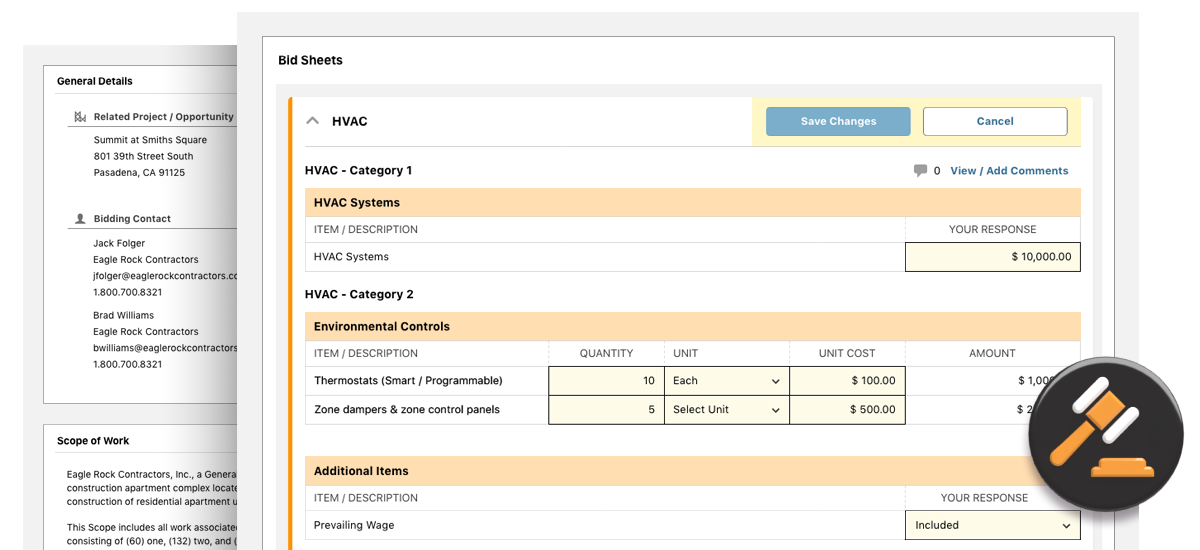
Construction Bid Management Software
Docusign™ eSignatures

Docusign™ eSignatures

Digital Signatures That Keep Projects Moving.

Send, sign, and track documents with DocuSign eSignatures in ConstructionOnline—no printing, scanning, or email chains required. With full visibility from start to finish, teams move faster and projects stay on track.
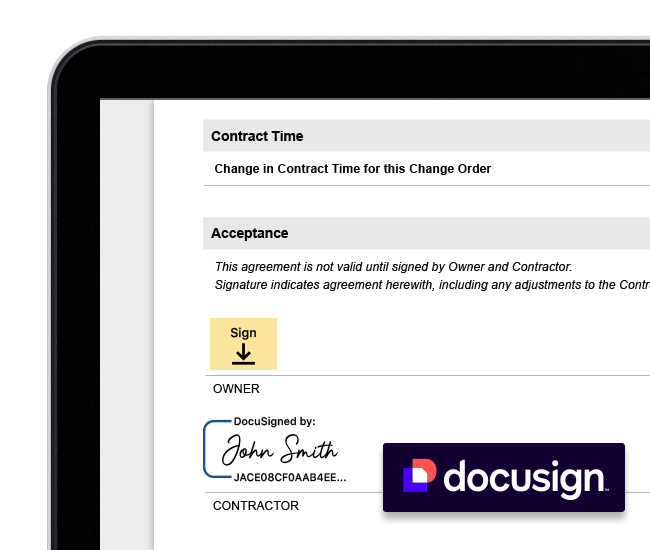
Docusign eSignatures
QR Codes for Easy Construction File Sharing

QR Codes

Access Project Files Instantly with Convenient QR Codes.

Generate custom QR Codes for any project file or folder, giving teams, trade partners, or clients immediate, easy access to the latest project documents—perfect for the jobsite, office, or on the go.
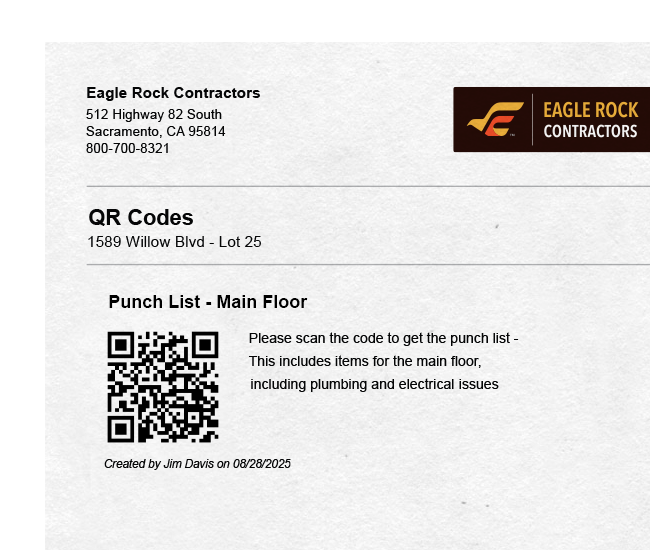
QR Codes for Easy Construction File Sharing

ConstructionOnline's cutting-edge tools deliver maximum ROI:
See What’s New & Improved for 2026

New & Enhanced Financial Tools

  • Purchase Orders added to TeamLink, giving subcontractors and vendors portal access to POs
  • Additional Line Items supported on Purchase Orders for maximum flexibility and greater detail
  • Custom Amounts can now be entered on Purchase Orders generated from Selections and Change Orders
  • New Ribbon-Style Navigation makes it easier than ever to navigate construction estimates
  • Uniform Resource Assignment introduced for estimate subcategories
  • New Easy Sheet Selector enables seamless switching between estimate tabs, eliminating tedious scrolling
  • Advanced Classification Report provides a detailed breakdown of estimate values by assigned classifications
  • Default Markup Settings apply a defined percentage or dollar markup automatically
  • 3-Level Detail added to show Category, Subcategory and Item-level data
  • Invoices can now be created from Scratch, independently of Estimates and Selections
  • Invoices can now be created directly from Bills & Expenses, aligning job costing and billing activities
  • Retainage values can now be included on invoices, supporting greater billing accuracy
  • Drag & Drop Ordering offers easy, efficient reordering of costbook folders and items 
  • New Sorting Options allow costbook items to be sorted alphabetically or by creation date
  • Improved Search functions now include more detail for faster, more thorough review
  • Create Bid Packages to organize bid sheets, documents, plans, and more
  • Invite Bidders to review bid sheets, declare bid intentions, and submit bids
  • Easily compare bid submissions and confidently award bids while maintaining a clear audit trail
  • Generate Purchase Orders directly from awarded bids to keep projects moving forward seamlessly
  • Create Bid Templates to save time and standardize future bid packages
Construction Meeting Minutes Software

Meeting Minutes

Better Meetings. Better Results.

Spend less time chasing updates and more time building. Meeting Minutes helps teams record participation, key takeaways, and next steps in one place, turning every conversation into documented action items with clear ownership so projects stay on track and teams stay accountable.
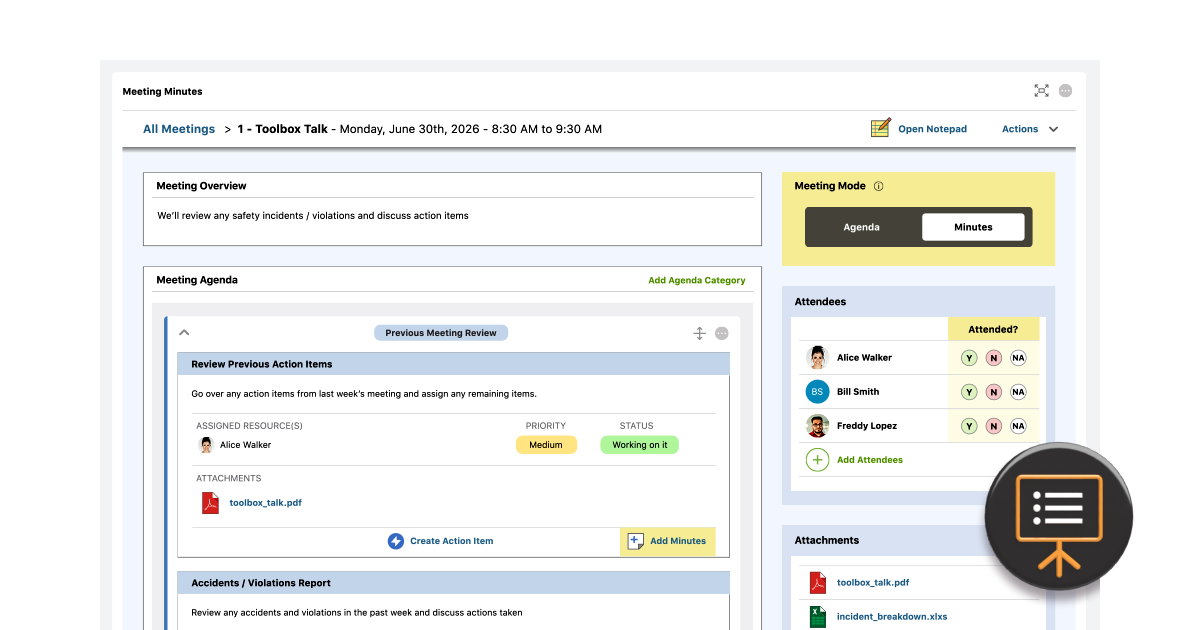
Construction Meeting Minutes Software

Enhanced Scheduling Tools for 2026

  • New Ribbon-Style Navigation simplifies navigation within construction schedules
  • Improved Schedule Prints can now be sorted by Name, Number, Start Date, and End Date
  • New Undo/Redo keyboard shortcuts (Ctrl-Z & Ctrl-Y) support faster, easier schedule updates
  • Schedule List Views can now be exported directly to Excel

Improved CRM & Sales Tools for 2026

  • Automatically Create Leads in ConstructionOnline from HubSpot contacts
  • Set Custom Triggers to control which HubSpot actions create new ConstructionOnline leads
  • Push Lead Information from ConstructionOnline into HubSpot, manually or through automation
Agenda View | UDA ConstructionOnline

Agenda View

Your Day. Your Way. One Dashboard.

ConstructionOnline's Agenda View consolidates tasks, events, messages, updates, and more from all projects into one streamlined, customizable dashboard. Designed to help individual team members start every day organized, with clear priorities and an executable action plan.

Construction Task Management Software | Agenda View

New Project Tracking Tools for 2026

  • Comments can now be added to Daily Logs for clearer context and follow-up
  • All Daily Log Types can now be created via Mobile App for faster field reporting
  • Detailed Excel Exports now include To Do Subtasks and additional item details
  • Comments can now be added to To Dos and Subtasks, empowering better collaboration
  • Automated Reminders can be created for Punch List Items to promote project progress
  • Improved Search functions now support filtering by Room and Location for faster, easier task management 
  • Agenda View Added to ClientLink, offering clients greater insight into what's important and what's upcoming
  • Additional Feature Widgets Added to Agenda View, including Warranty Tracking, RFIs, and Bid Tracking
  • New Calendar Views show scheduled tasks and potential resource conflicts
  • Schedule & Manage Meetings to keep teams aligned and focused on what matters most
  • Invite Meeting Attendees, set reminders, and track attendance responses
  • Set Meeting Agendas and share with attendees to keep discussions on track
  • Create Action Items to provide direction and detail on any and all follow-up tasks
Hubspot™ Integration

Hubspot Integration

Sync Leads. Close Deals. Build Projects.

Sync HubSpot's industry-leading CRM with ConstructionOnline's top-rated project management software to streamline lead tracking, automate data entry, and create seamless handoffs from sales reps to project management teams.
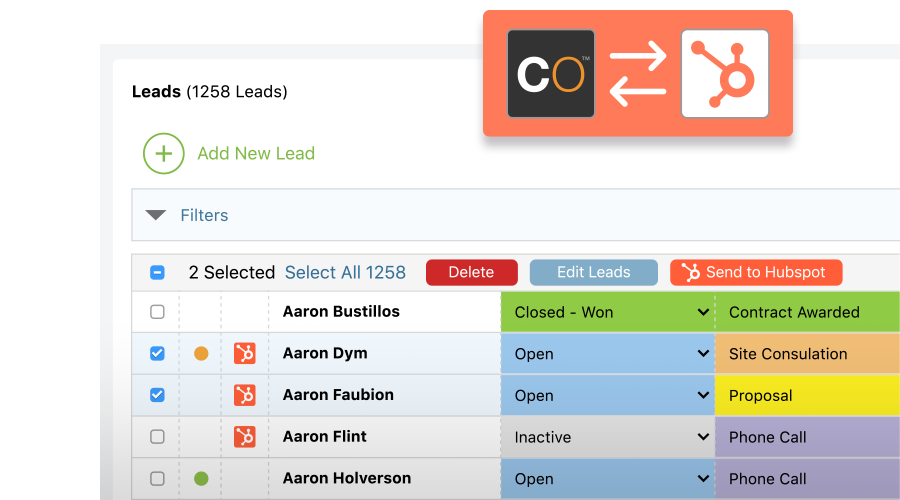
Hubspot™ Integration for Construction Project Management Software
Construction CRM Integration with HubSpot
Redline™ Takeoff

Redline Takeoff

Joist Takeoffs, Simplified.

The new Joist Tool in Redline Takeoff makes it easier to measure and quantify framing layouts with greater precision—helping teams build faster, more accurate construction estimates.
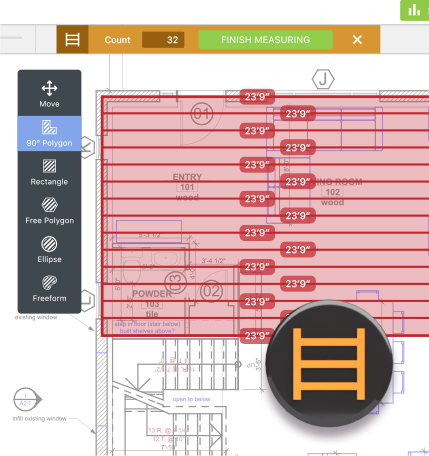
Joist Measurement Tool for Redline™ Takeoff

Enhanced Reporting for 2026

  • Send proposals and contracts directly to DocuSign™ without leaving ConstructionOnline
  • Company Estimating Reports expanded to include Phase, Group, Type, Trade and Stage columns
  • Add Custom Watermarks to construction proposals
  • Insert Autodoc Fields into Default Text blocks for more detailed contracts & docs
  • Display Cost Codes clearly in estimate proposals
  • Group data by Date, Project, Employee, and/or Cost Code on Time Tracking Reports
  • Include detailed tax breakdowns on Change Order Proposals & Contracts
ConstructionOnline Comments

Comments

Keep Project Conversations
in Context.

Comments are now available across ConstructionOnline's platform—from change orders to daily logs to warranty tracking and more. Teams can ask questions, share updates, and collaborate directly where work happens, keeping everyone aligned.
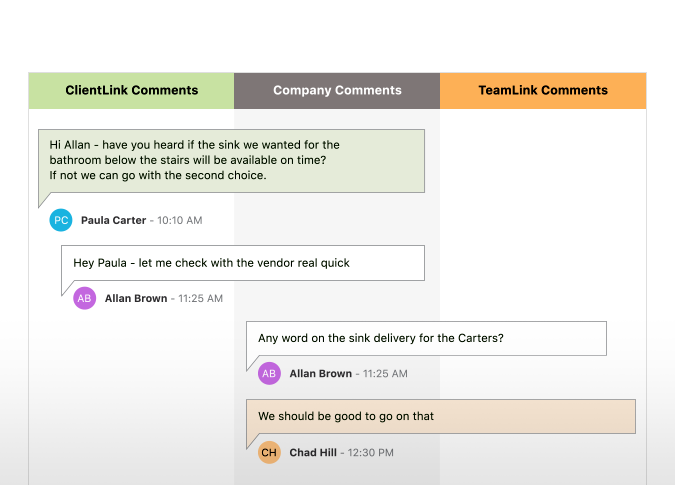
Simplify Construction Project Management with Comment Threads in ConstructionOnline
Detailed Construction Invoicing & Retainage

Detailed Invoicing & Retainage

Improve Cash Flow with
Better Billing.

Bring more transparency to every invoice with additional detail and advanced retainage controls—making it easier to communicate costs, protect margins, and keep cash flowing without unnecessary delays or disputes.
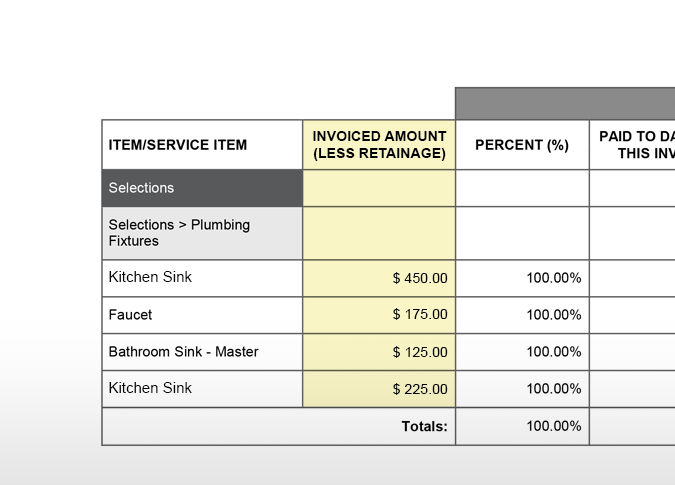
Detailed Construction Invoices with Retainage
Construction Project Management Reminders

Automated Reminders

Never Miss a Deadline.

With automated reminders available across more features, teams can stay aligned on key tasks and next steps—reducing delays and keeping projects on track from start to finish.

Construction Project Management Reminders
ConstructionOnline Excel Exports

Excel Exports

Do More with Your Data.

Expanded Excel exports make it easy to share project data, build reports, and work offline—with new & improved exports for Invoicing, Purchasing, Scheduling, and Estimating.

Excel Exports for Construction Project Management
Construction Time Tracking | Geolocation Data

Time Tracking

On-the-Clock Location.

Always know where employees clock in and out—and where they work throughout the shift. Enhanced geolocation settings support team accountability and cleaner time cards.

Verified Jobsite Location Data for Time Entries

Enhanced Redline Planroom & Takeoff

  • Improved Plan Uploads offer better controls for previewing sheets and revising duplicate sheet numbers
  • New Eraser Tool gives users the ability to remove segments of freehand drawings and highlighter markups
  • New Magnification Tool allows users to get a closer look at specific areas of focus on project plans
  • Color-Coded Pins let users assign colors to features and automatically apply preferences to pinned items
  • New Joist Tool provides users the ability quickly calculate area measurements and joist quantities

New & Enhanced Dashboards

  • Lead Dashboards provide insights into lead volume, quality, source, and more
  • Sales Rep Dashboards highlight team performance and sales activity at-a-glance
  • Opportunity Dashboards aggregate data related to opportunity close rate, dollar value and more
  • Sales Overview Dashboards deliver high-level metrics on pipeline trends and sales success rates
TrueVision™ Sales Dashboards

TrueVision™ Sales Dashboards

Smarter Insights. Faster Decisions. Stronger Growth.

TrueVision Sales Dashboards deliver automated insights on lead quality, conversion rates, pipeline health, and rep performance—transforming sales data into actionable intelligence. Customizable widgets let teams track the metrics that matter most, empowering smarter decisions that accelerate growth and maximize revenue.
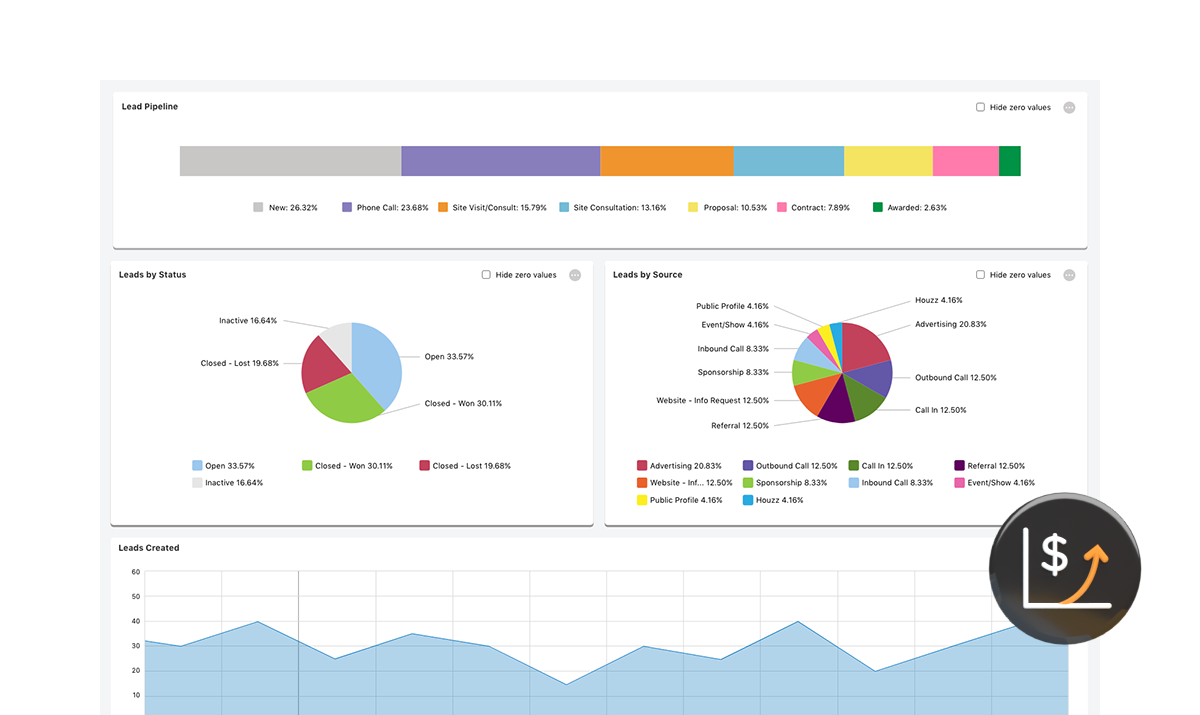
TrueVision™ Sales Dashboards
Custom Watermarks for Construction Estimate Proposals

Custom Watermarks

Present Professional Proposals with Custom Watermarks.

Apply custom text watermarks to estimate proposals to reinforce branding, clearly communicate document status, and help clients understand exactly what they’re reviewing.
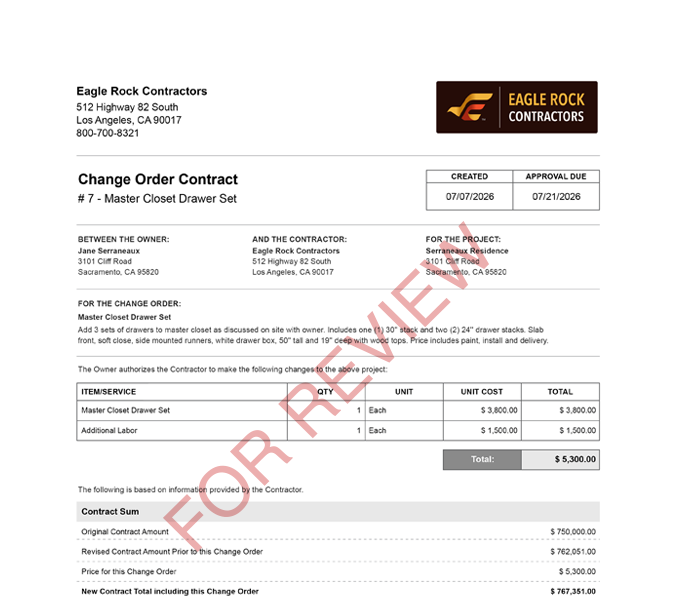

Custom Watermarks for Construction Estimate Proposals
Construction Project Management Mobile App Improvements

Mobile App Improvements

Tap Into a Faster, Smarter Mobile Experience with CO™ Mobile.

Major mobile app improvements deliver smoother navigation, stronger performance, and expanded tools for purchasing, meetings, scheduling, and more—so work keeps moving wherever it happens.

Mobile App Improvements
Construction Project Management Mobile App Improvements